AI coding agents are changing the way developers build software. These tools can read a codebase, create files, update existing code, run commands, and help fix errors.
However, AI agents are not perfect. They can misunderstand a requirement, change the wrong file, introduce a bug, or miss an important project rule.
For this reason, simply giving an AI agent access to a codebase is not enough.
The agent also needs clear instructions, useful tools, project knowledge, tests, and ways to check its work. This is where harness engineering becomes important.
What Is Harness Engineering?
Harness engineering means building a reliable environment around an AI coding agent.
This environment gives the agent the information and tools it needs to work on a software project. It can include project instructions, documentation, coding rules, tests, development tools, permissions, and feedback systems.
For example, a developer needs to know how a project works before making a major change. The same idea applies to an AI agent.
The agent should understand the project structure. It should also know which commands to run, which rules to follow, and how to check its changes.
Therefore, harness engineering is not just about giving better prompts to an AI model. It is about creating the right environment for the model to work in.
Why Is Harness Engineering Important?
AI coding agents are becoming more capable every day. They can now handle tasks that once required several manual development steps.
For example, an agent can create a feature, update an API, modify a database model, write tests, and fix errors.
However, speed can also create problems.
An agent may make a change that looks correct but does not match the existing architecture. It may also change a shared component and accidentally break another part of the application.
As a result, AI-assisted development needs strong checks around the agent.
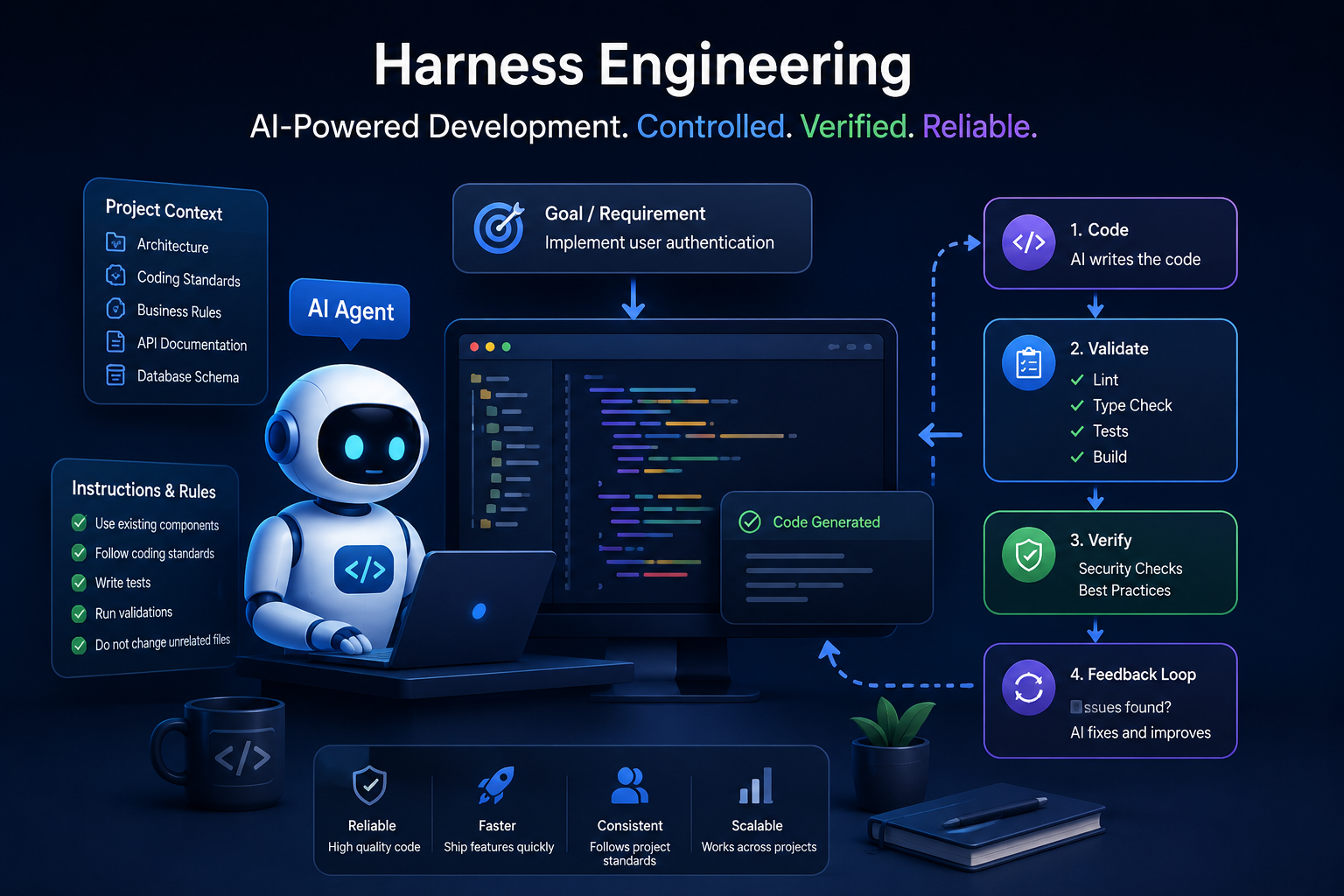
A good harness gives the agent a clear process. First, the agent understands the task. Next, it makes the change. Then, it checks the result. If something fails, the agent can make another change and test it again.
This process makes AI-assisted development more reliable.
The Main Parts of Harness Engineering
1. Clear Project Instructions
First, an AI agent needs clear instructions about the project.
These instructions can explain:
- How the project is structured
- Which coding standards to follow
- Where different types of files belong
- How APIs should be created
- How database changes should be handled
- Which commands should be used
- Which files should not be changed
For example, a project can contain a development guide that explains its main rules.
This saves time because developers do not need to repeat the same information in every prompt.
More importantly, the agent gets a consistent source of information before it starts working.
2. Useful Documentation
Documentation is another important part of a good harness.
An AI agent needs context to make good decisions. Without that context, it may make assumptions about how the application works.
Useful documentation can explain:
- Application architecture
- Important modules
- API structure
- Database relationships
- Authentication
- Development commands
- Testing procedures
- Deployment steps
- Important business rules
In addition, documentation should be updated when the project changes.
For example, if an authentication system changes from one provider to another, the project documentation should explain the new flow.
This helps the agent avoid using outdated information.
3. Development Tools and Commands
A good harness should give the agent access to useful development tools.
These tools allow the agent to check its own work instead of simply assuming that the code is correct.
For example, a JavaScript or TypeScript project may use commands such as:
npm run lint
npm run typecheck
npm test
A Python project may use:
ruff check .
mypy .
pytest
These commands provide useful feedback.
For example, if the agent changes a Python file and Ruff finds a problem, the agent can inspect the error and fix it.
Therefore, development commands become an important part of the agent’s working environment.
4. Automated Testing
Testing is one of the most important parts of harness engineering.
AI-generated code may look correct while still having a logical problem. Automated tests help detect these problems.
A project can use different types of tests, including:
- Unit tests
- Integration tests
- API tests
- End-to-end tests
- Regression tests
For example, imagine that an AI agent creates a new login feature.
The agent can implement the feature and then run the existing tests. If a test fails, the result gives the agent useful feedback.
The agent can then investigate the failure, update the code, and run the tests again.
As a result, testing becomes part of the development process instead of being an afterthought.
5. Linting and Type Checking
Linting and type checking add another layer of protection.
A linter checks source code for common problems and coding issues.
For example:
npm run lint
A Python project can use:
ruff check .
Type checking is also useful. It checks whether values and functions are being used with the expected types.
For TypeScript, a project may use:
npm run typecheck
For Python, a project may use:
mypy .
These checks can catch problems before the code reaches production.
Furthermore, they give the AI agent clear feedback about what needs to be fixed.
6. Guardrails and Constraints
AI agents should not have unlimited access to every part of a system.
Instead, the harness should define clear boundaries.
For example, an agent may be allowed to:
- Create source files
- Update application code
- Write tests
- Run local development commands
- Update documentation
However, some actions should require approval.
These actions may include:
- Deleting production data
- Changing production infrastructure
- Updating sensitive credentials
- Running destructive database commands
- Deploying directly to production
In this way, guardrails allow agents to work independently while protecting important systems.
The goal is not to stop automation. Instead, the goal is to make automation safer.
7. Feedback Loops
A strong feedback loop is another key part of harness engineering.
A simple workflow looks like this:
Understand → Implement → Validate → Fix → Validate Again
First, the agent understands the task and project rules.
Next, it implements the requested change.
After that, the project tools check the result.
If something fails, the agent receives feedback. It can then fix the problem and run the checks again.
Finally, the agent continues until the required checks pass.
This approach is much more reliable than asking an agent to write code and immediately consider the task finished.
8. Useful Error Messages
AI agents also need useful error messages.
A message such as:
“Something went wrong.”
does not provide enough information.
A better error should explain what happened and where the problem occurred.
For example, a useful test error can show:
- The failed test
- The expected value
- The actual value
- The file or function involved
- The reason for the failure
With better information, the agent has a better chance of fixing the problem.
Therefore, good error messages are an important part of the harness.
Harness Engineering vs Prompt Engineering
Harness engineering and prompt engineering are connected, but they are different concepts.
Prompt engineering focuses on the instructions given to an AI model.
For example, a developer may ask:
“Create a login API using the existing authentication pattern and add tests.”
That prompt explains the task.
Harness engineering covers the larger environment around that task.
The environment can provide:
- Project instructions
- Documentation
- Development tools
- Automated tests
- Linting
- Type checking
- Permissions
- Error feedback
- Validation rules
Therefore, prompt engineering tells the AI what to do, while harness engineering helps create the environment in which the AI can do it reliably.
A Simple Example of Harness Engineering
Consider a developer who asks an AI agent to add a user profile feature.
Without a harness, the agent may create a new component and API endpoint. It may also change the database and stop once the code looks complete.
At first, the feature may appear to work.
However, the implementation may not follow the existing project structure. It may also introduce errors in another part of the application.
Now consider the same task with a good harness.
The agent first reads the project instructions. Then, it reviews similar features that already exist.
Next, it implements the new profile feature.
After that, the agent runs linting, type checking, and tests.
If a check fails, the agent investigates the problem. It then updates the code and runs the checks again.
This creates a simple but effective development cycle:
Understand → Implement → Validate → Fix → Validate Again
The important difference is that the agent does not stop simply because code has been generated.
Instead, the environment helps the agent verify its work.
Benefits of Harness Engineering
Better Code Quality
Automated checks can catch many problems before they reach production.
As a result, developers can review code with greater confidence.
More Consistent Development
Project rules and documentation help the agent follow the same patterns used by the rest of the team.
This is especially useful in large codebases.
Faster Development
A well-configured agent can run tests, inspect errors, and make corrections without waiting for a developer to perform every small step.
Therefore, developers can spend more time on design and important decisions.
Safer AI Automation
Guardrails reduce the chance of destructive or unsafe changes.
For example, production systems can require human approval for sensitive operations.
Easier Maintenance
Clear documentation and project rules make the codebase easier to understand.
They also help future developers and AI agents work with the project.
Better Use of AI Coding Agents
Without a good environment, an AI agent is mainly a code generation tool.
With a strong harness, it can become part of a larger software development workflow.
How to Start Using Harness Engineering
You do not need a complicated system to get started.
Instead, begin with a few practical improvements.
Step 1: Create Project Instructions
Document the project structure, coding rules, important commands, and testing process.
Keep these instructions easy to find.
Step 2: Add Automated Checks
Make sure your project has commands for:
- Linting
- Type checking
- Testing
- Building
These checks should be easy for both developers and AI agents to run.
Step 3: Improve Documentation
Document important architecture decisions, APIs, workflows, and business rules.
Furthermore, update the documentation when important parts of the system change.
Step 4: Add Guardrails
Decide which actions the agent can perform automatically.
Also decide which actions require human approval.
For example, local code changes may be automatic, while production deployments may require approval.
Step 5: Create a Validation Loop
Make validation part of the normal development process.
After a significant change, run the relevant checks.
If something fails, fix it and run the checks again.
Step 6: Improve the Harness Over Time
A harness should evolve with the project.
If an AI agent repeatedly makes the same mistake, investigate why it happens.
Perhaps the documentation is unclear. Maybe a test is missing. In some cases, the project may need a new rule or validation step.
Therefore, every recurring failure can become an opportunity to improve the development environment.
The Future of AI-Assisted Software Development
AI coding agents are becoming more capable.
However, better AI models alone are not enough to create reliable software.
The environment around the model also matters.
A strong AI development workflow can combine:
- Capable AI models
- Clear project instructions
- Good documentation
- Development tools
- Automated tests
- Type checking
- Linting
- Guardrails
- Feedback loops
- Human oversight
In addition, the harness can improve as the team learns more about how its AI agents behave.
For example, if an agent repeatedly changes the wrong type of file, the team can add a project rule.
If an agent misses a particular bug, the team can add a test.
If an agent struggles to understand a workflow, the team can improve the documentation.
As a result, the development environment becomes stronger over time.
Conclusion
Harness engineering is about more than writing better prompts.
It is about creating a reliable environment where AI coding agents can understand a project, make changes, validate their work, and recover from failures.
The approach combines project instructions, documentation, tools, testing, linting, type checking, guardrails, and feedback loops.
As AI agents become more autonomous, this environment becomes increasingly important.
The future of AI-assisted software development will not depend only on how capable the AI model is. It will also depend on how well the development environment is designed.
A capable AI agent with a well-designed harness can become a reliable part of the software development lifecycle.
Further Reading
For a deeper look at harness engineering and AI-assisted development, read OpenAI’s engineering discussion of harness engineering.